





















Colleagues around a long conference table watching a woman present at a screen in a modern office
Enabling Solutions

Commons Workplace. Hire, pay and bring everyone along.

HR, payroll and an intranet in one place, for nonprofits, startups and enterprises. From the first day to the last payslip, on the web and on every phone, with AI that does the busywork.

Web and mobile · AI-native · White-label · Multilingual · Works offline · DPDP compliant

Scroll

Six tools, or one.

Most organisations run their people on a pile of tools that do not talk to each other, and someone spends the last week of every month stitching them together.

Today

  1. Staff list in a spreadsheet
  2. Attendance register
  3. Leave on email
  4. Payroll in Excel
  5. Claims on paper
  6. Announcements on WhatsApp

With Commons Workplace

  1. A small team talking and working on laptops around café tables in a bright office

    Hire and onboard

    • Offer to first day
    • Documents and e-sign
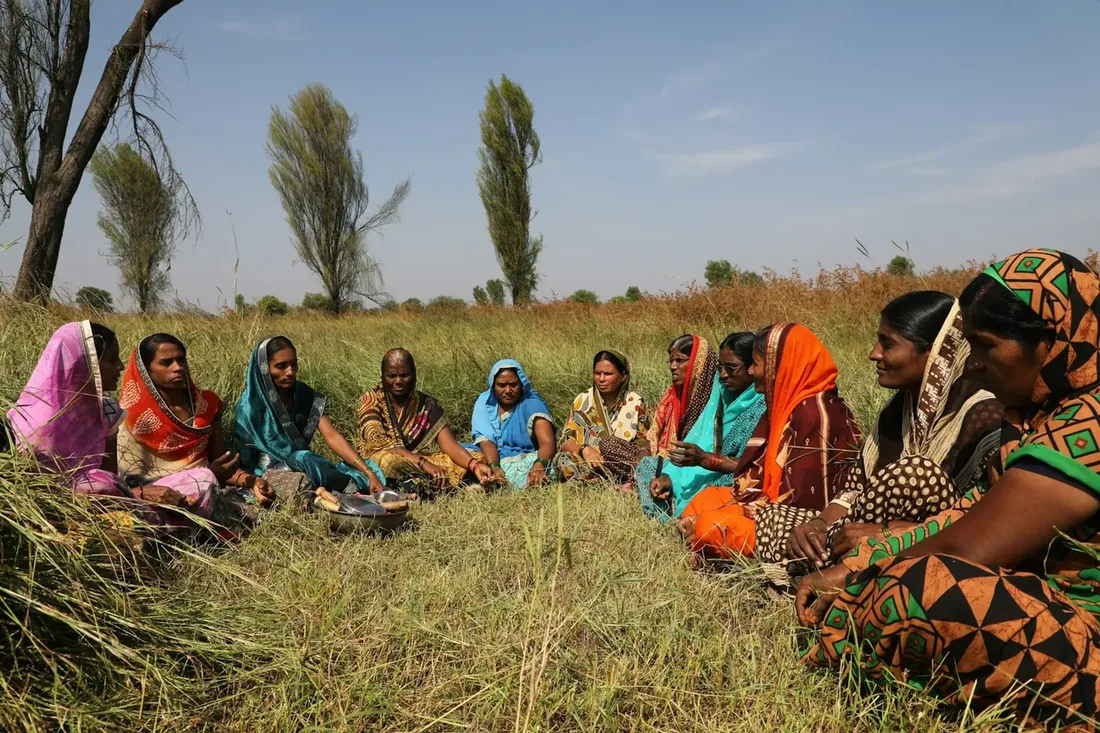
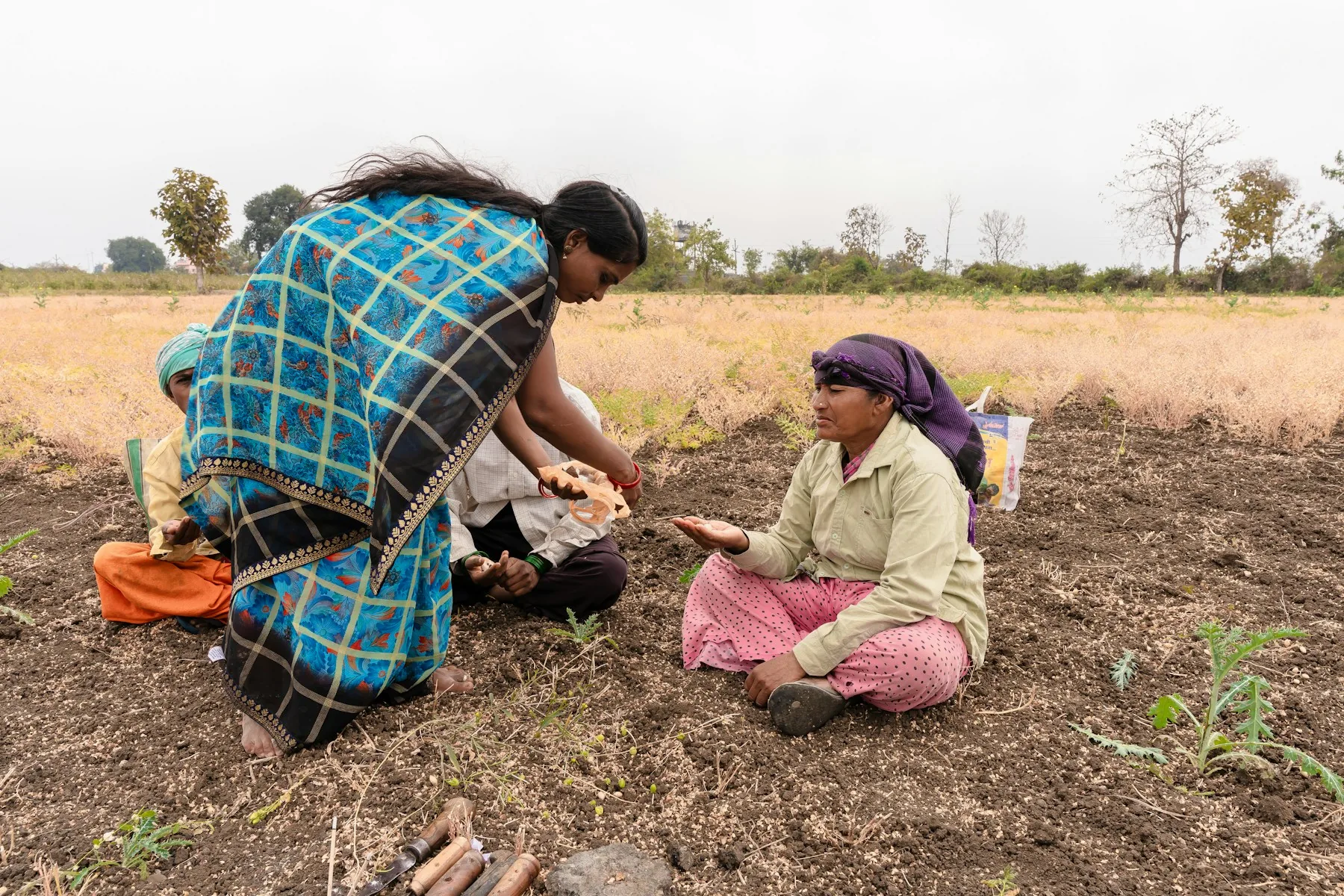
  2. A woman in a blue checked sari bends to talk with women farmers sitting in a ploughed field

    Show up

    • Attendance
    • Leave
    • Timesheets
  3. A young man in a striped shirt checking his phone at his office desk

    Get paid

    • Payroll
    • Expenses
    • Payslips
  4. A group of laughing women in bright saris standing together with children

    Stay in the loop

    • Intranet
    • Goals
    • Learning

Ask in plain words. Get it done.

Ask Workplace sits on top of every module. It answers from your own data, in your language, and offers the next step, so a question becomes an action instead of a report request.

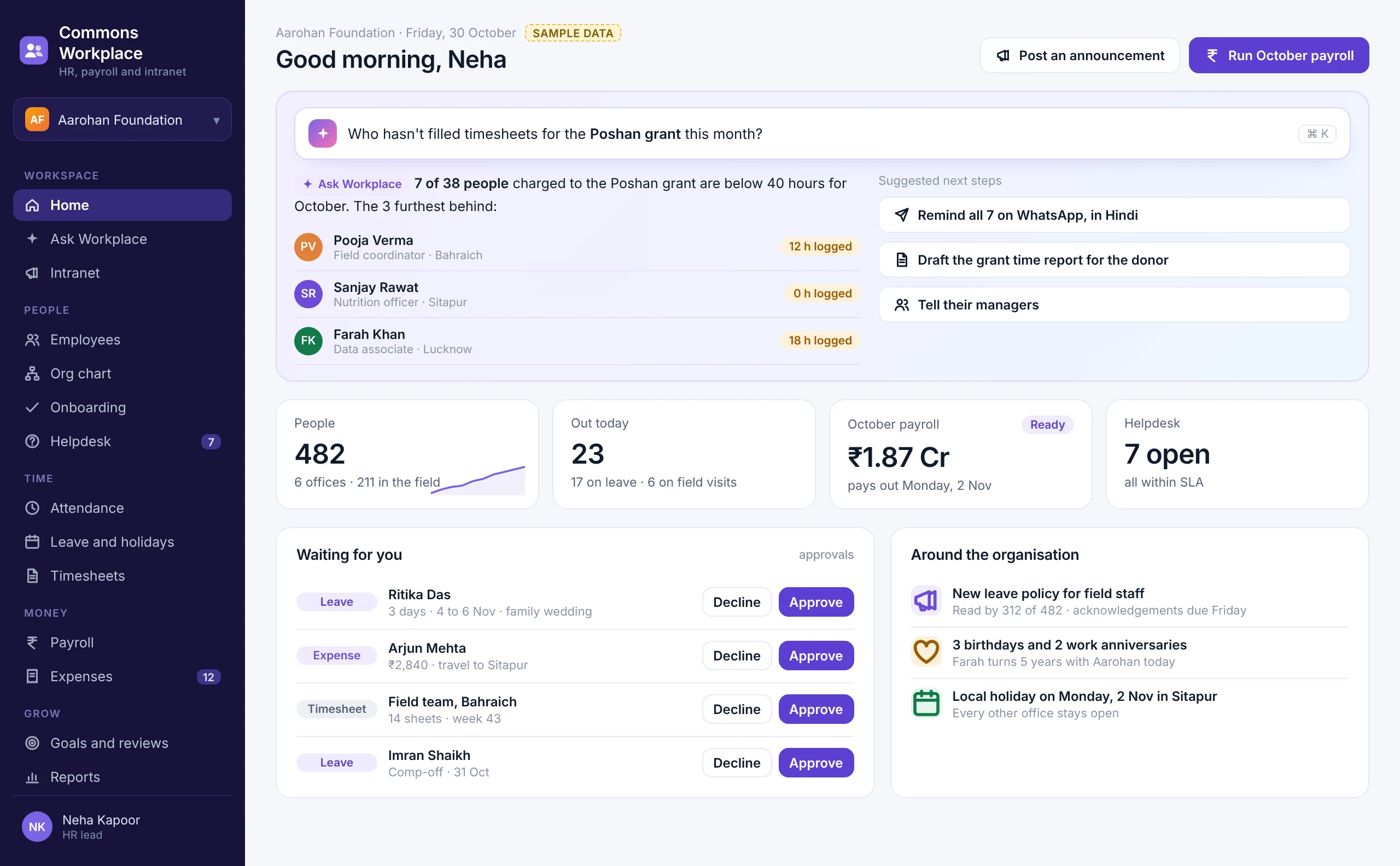
The Commons Workplace home: Ask Workplace answers who has not filled timesheets for a grant, with headcount, people out today, payroll status and approvals
  1. 01

    Ask anything about your people, in your language

  2. 02

    Answers from your own records, never guesses

  3. 03

    One tap to act: remind, approve, draft

  4. 04

    Sees only what your role is allowed to see

Everyone, and who they report to.

One record for every person, from offer letter to exit, and an org chart that stays true because it is drawn from that record.

  1. 01Employee recordsPersonal details, documents, contracts and history in one profile.
  2. 02Org hierarchy and reporting linesDepartments, offices, positions, managers and dotted lines.
  3. 03Many entities, one accountA foundation, a section 8 company and a trust, each with its own rules.
  4. 04Staff, consultants, fellows and volunteersDifferent people, different terms, the same directory.
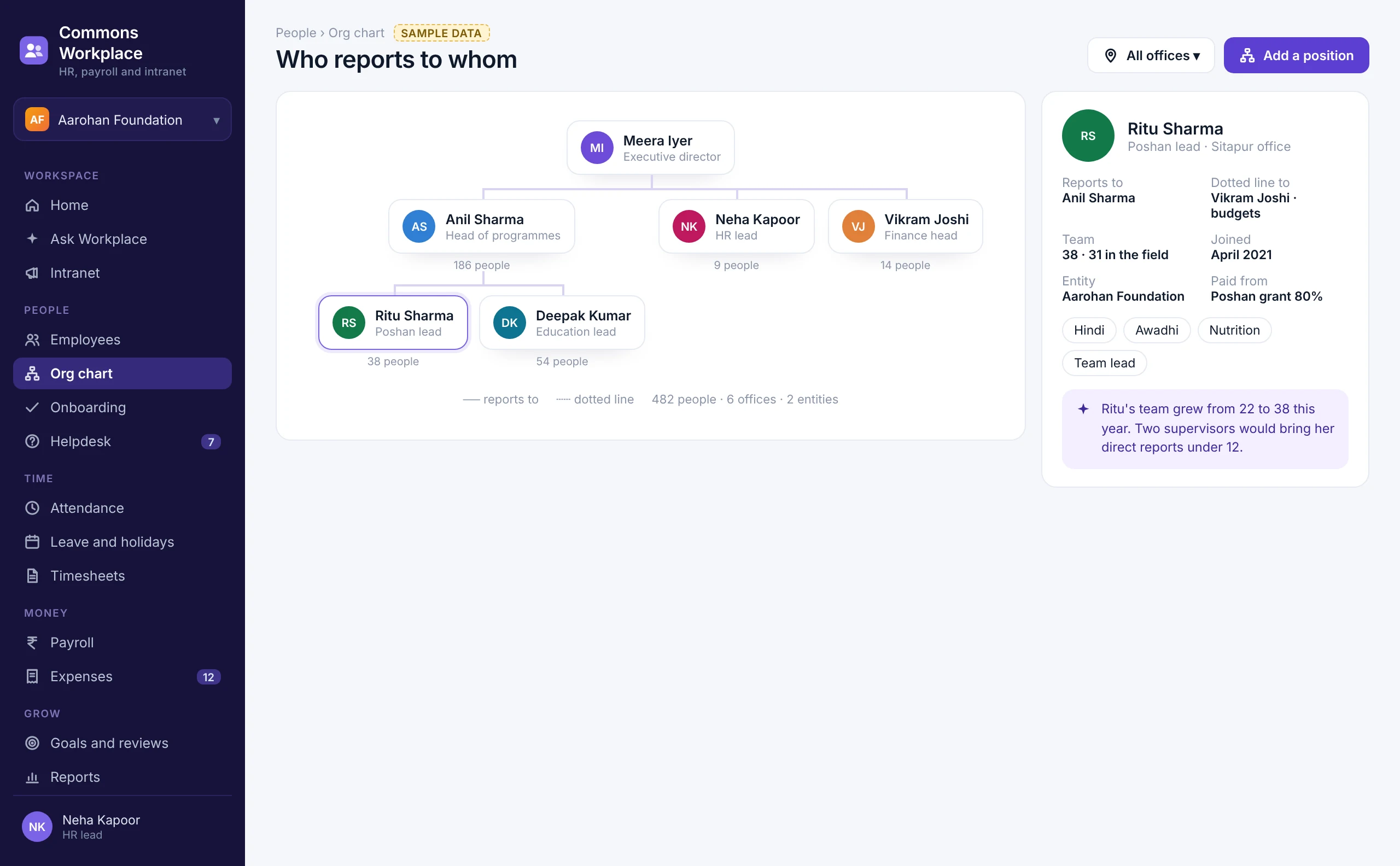
The org chart, with reporting lines, team sizes and one manager's profile with a dotted-line report and an AI suggestion

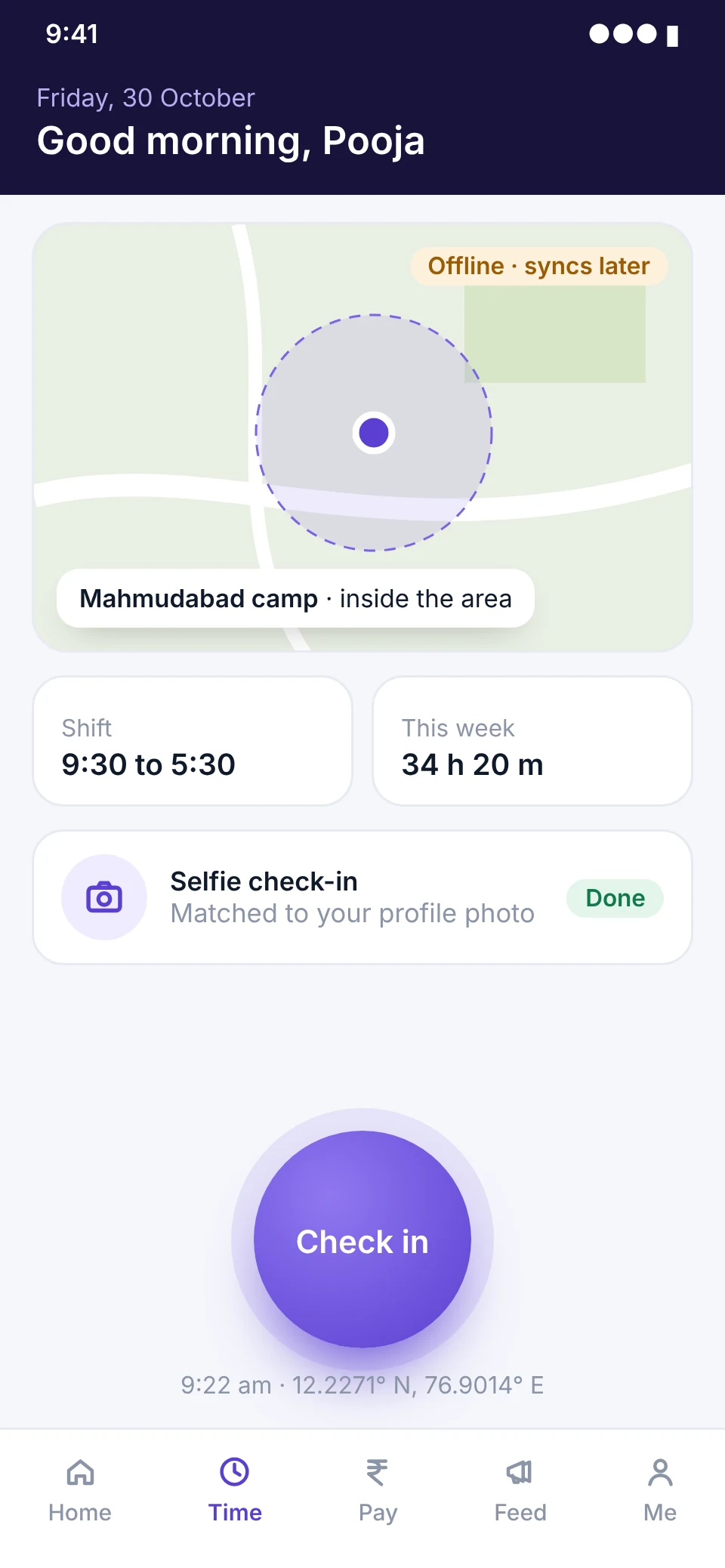
Attendance that works where the network does not.

Check in from the office, a camp or a client site. The phone knows where you are, works offline, and syncs when it finds a signal.

  1. 01Geo-fenced and selfie check-inInside the office or the camp, matched to the profile photo.
  2. 02Shifts, rotations and overtimePlan shifts, swap them on request, and count overtime fairly.
  3. 03Regularisation in two tapsForgot to check in? Ask, and your manager approves.
  4. 04Biometric devices and kiosksBring in punches from devices already on the wall.
A field worker checks in on her phone inside a camp's geo-fence, with a selfie, while offline

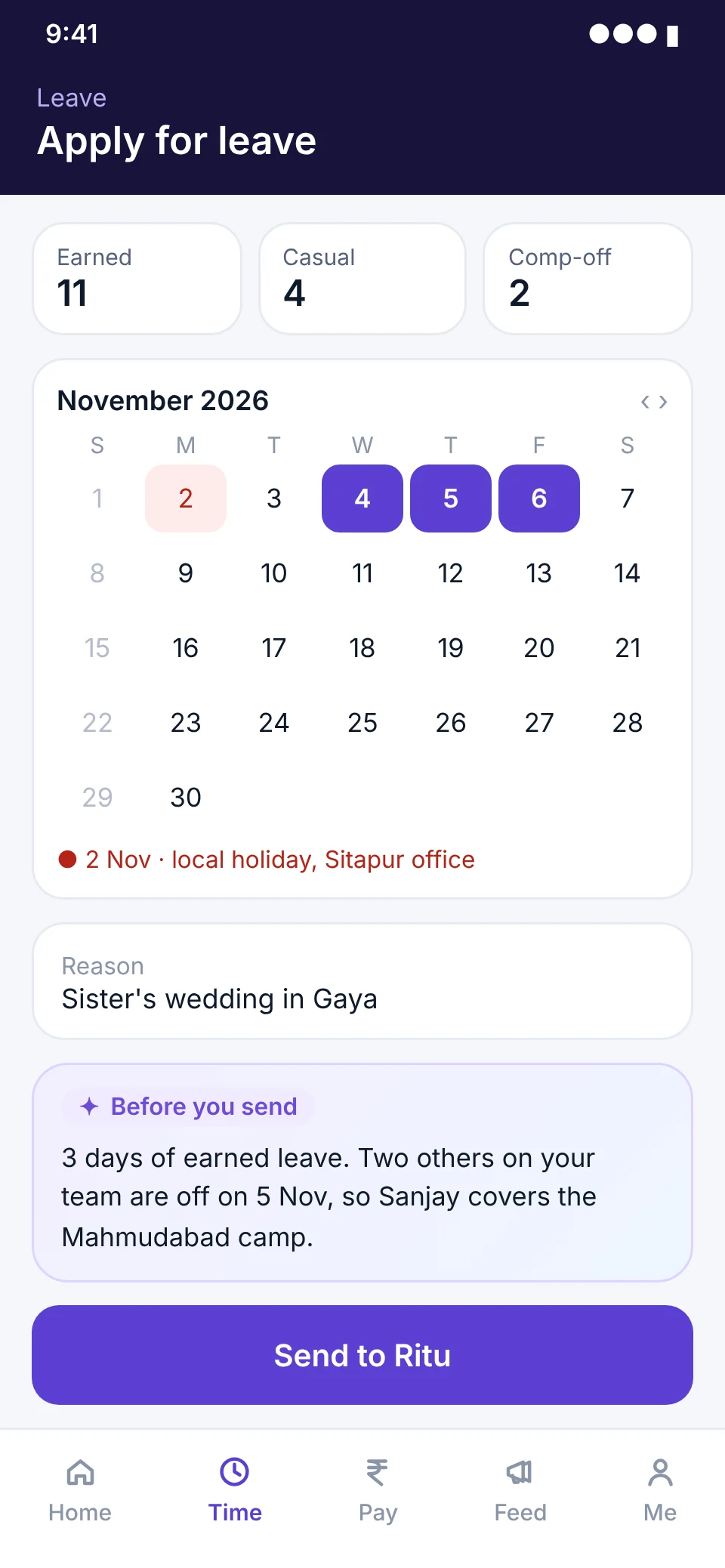
Leave and holidays, without the back and forth.

Balances people can see, policies the system applies, and holiday calendars for every office and state.

  1. 01Your own leave typesEarned, casual, sick, maternity, comp-off, sabbatical: set them once.
  2. 02Accrual, carry forward and encashmentWorked out every month, and paid out with payroll.
  3. 03Holiday calendars by officeDifferent states, different holidays, no confusion.
  4. 04Approvals that know the teamManagers see who else is off before they say yes.
Applying for leave on the phone: balances, a calendar with a local holiday, and an AI note on who covers

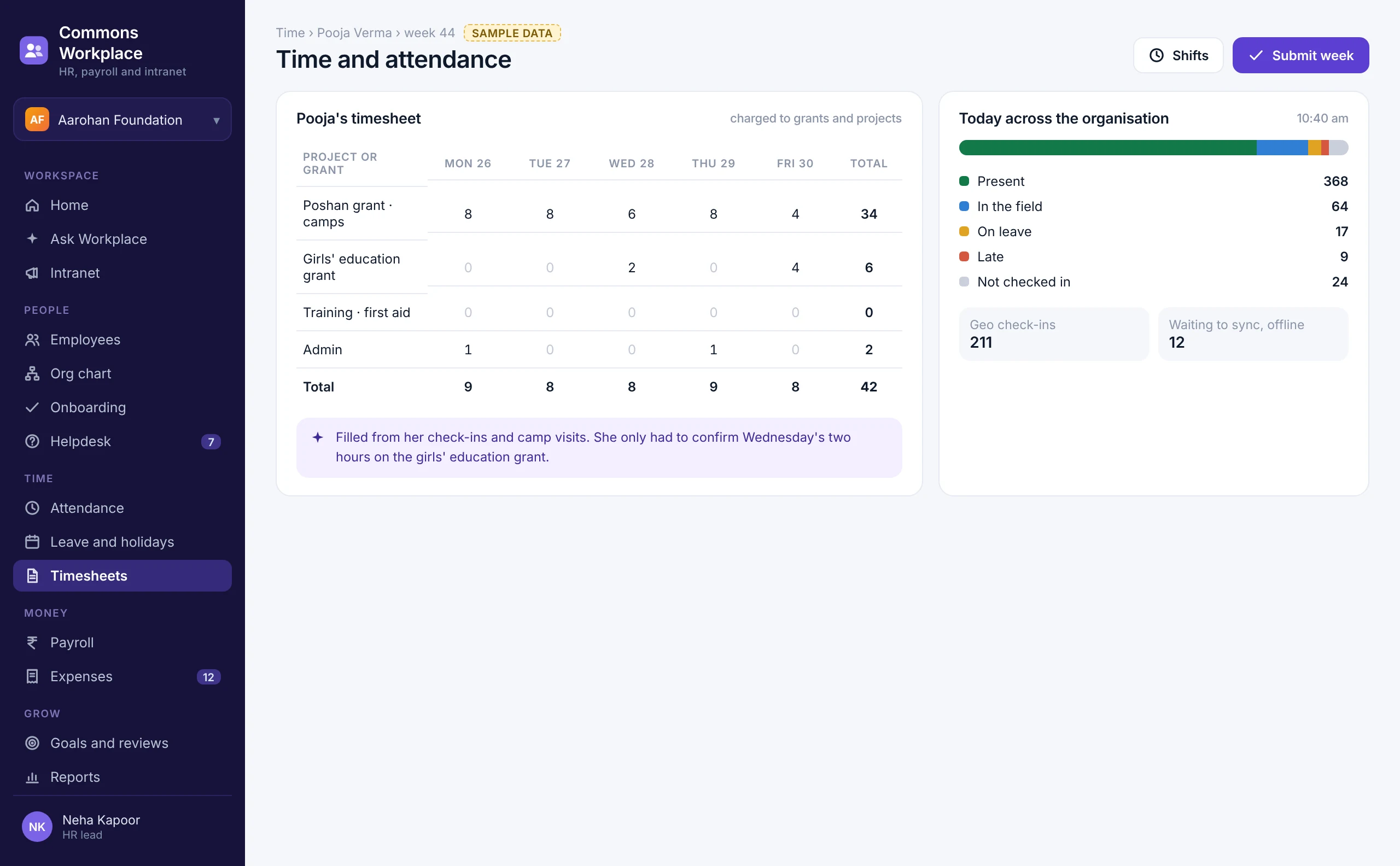
Timesheets that fill themselves.

Hours are drawn from check-ins, field visits and calendars, and charged to the right project, client or grant. People confirm, managers approve, and the donor or client report is already done.

A weekly timesheet charged to grants, filled from check-ins, and today's attendance across the organisation
  1. 01

    Map time to projects, clients and grants

  2. 02

    Filled from check-ins and visits

  3. 03

    Weekly approvals

  4. 04

    Billing and donor reports from the same hours

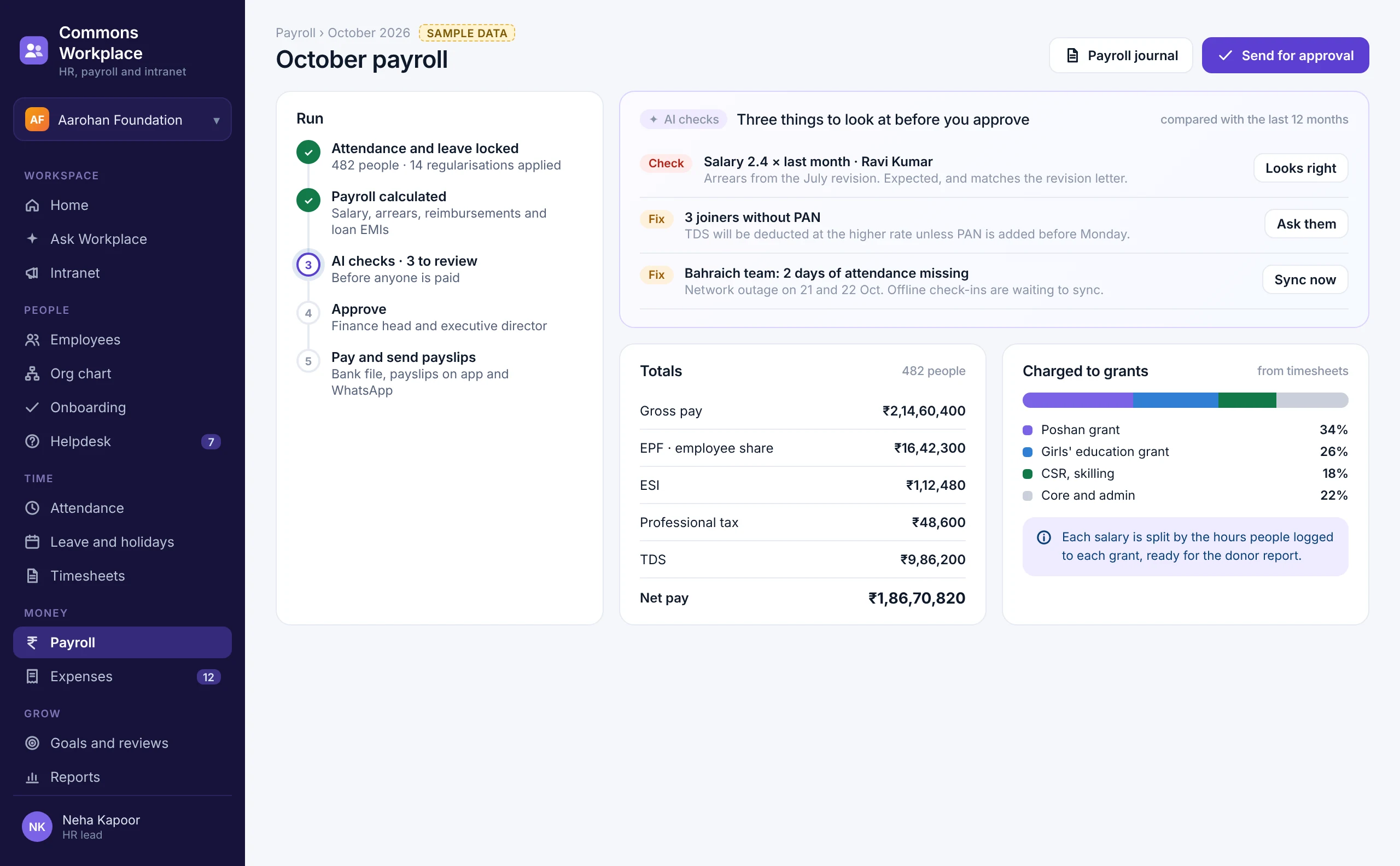
Payroll in an afternoon, checked before it is paid.

Attendance, leave, claims and loans flow straight in. AI compares the run with the last twelve months and tells you what looks odd, so nobody is paid wrongly.

October payroll: the run step by step, three AI checks before approval, statutory totals, and salaries charged to grants from timesheets
  1. 01

    EPF, ESI, PT, LWF and TDS, filed on time

  2. 02

    Payslips, Form 16 and investment proofs

  3. 03

    Loans, advances, arrears and revisions

  4. 04

    Full and final settlements

  5. 05

    Bank transfer file and payroll journal

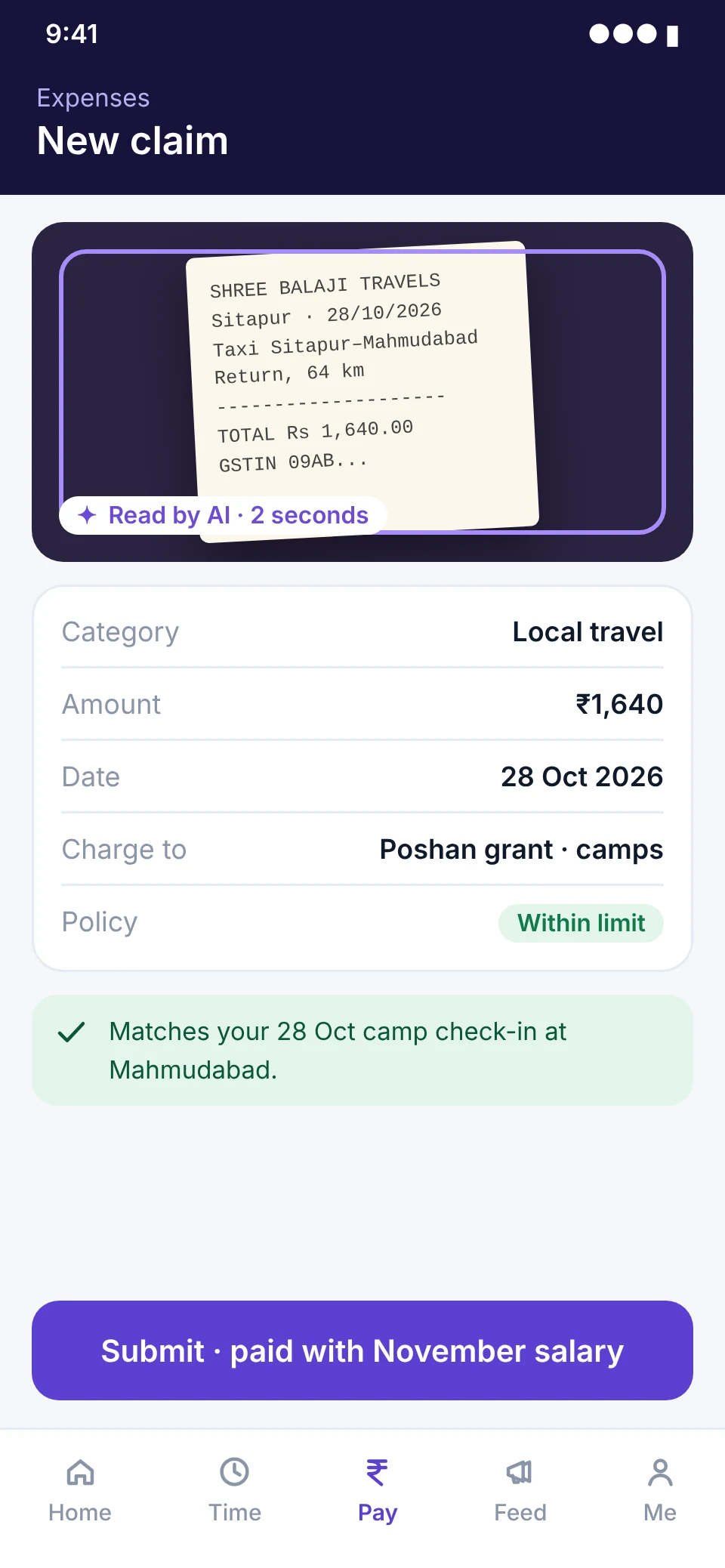
Snap a receipt. AI does the rest.

Claims that used to sit in a drawer are filed in seconds, checked against policy and paid with the next salary.

  1. 01Receipt read by AIAmount, date, vendor and category filled in for you.
  2. 02Policy checks before submitLimits, per diems and duplicate receipts caught early.
  3. 03Charge to a project or grantSo the cost lands in the right budget line.
  4. 04Advances and approvalsTravel advances, multi-level approvals, paid with payroll.
A taxi receipt photographed and read by AI, tagged to a grant and checked against policy

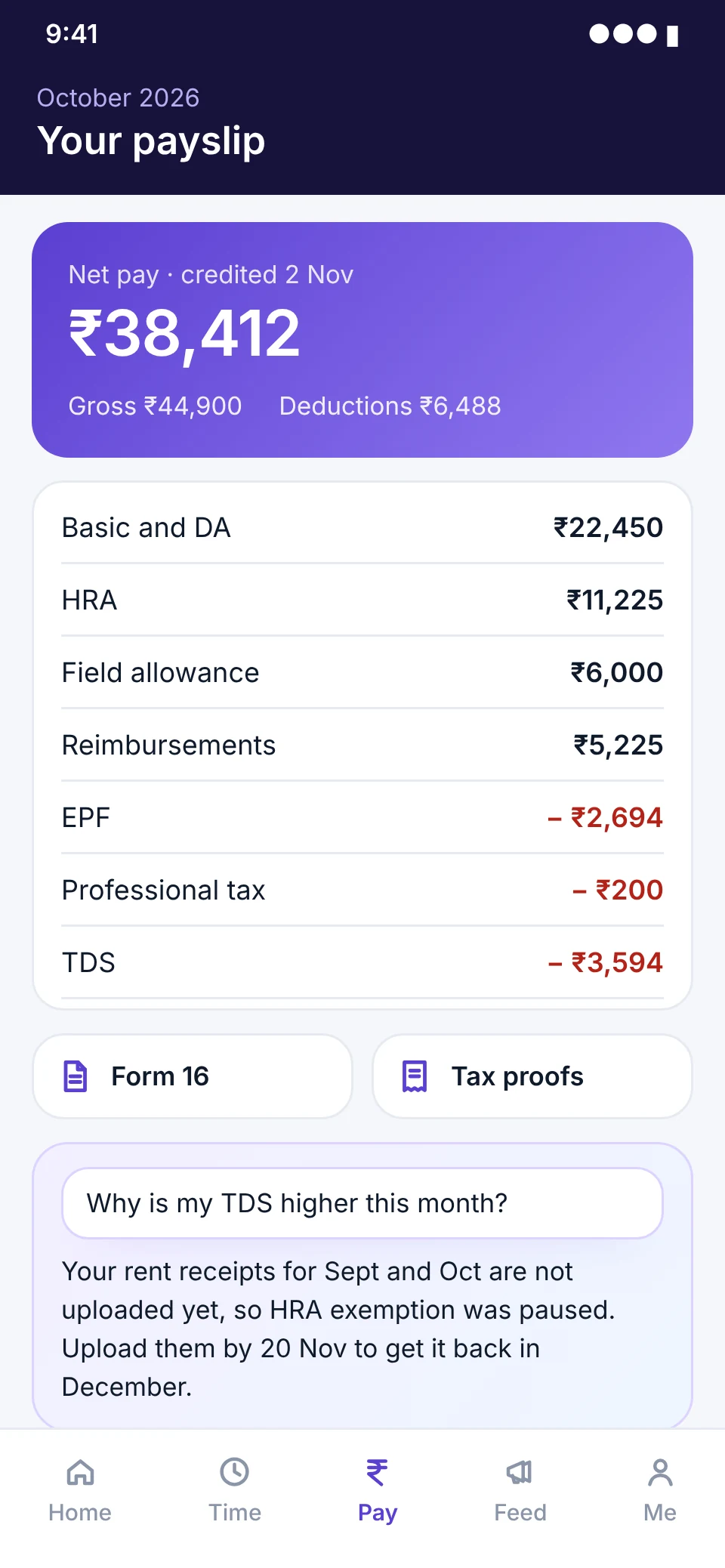
Everything about my job, in my pocket.

Payslips, tax, leave, claims and policies on the phone, and an assistant that explains them in plain words.

  1. 01Payslips and Form 16Every month, on the app and on WhatsApp.
  2. 02Tax declarations and proofsDeclare, upload, and see what it changes.
  3. 03Ask HR, get an answerA helpdesk with tickets, owners and response times.
  4. 04Documents and lettersOffer, experience and salary letters, on demand.
A payslip on the phone, with Form 16, tax proofs, and an AI answer on why TDS went up

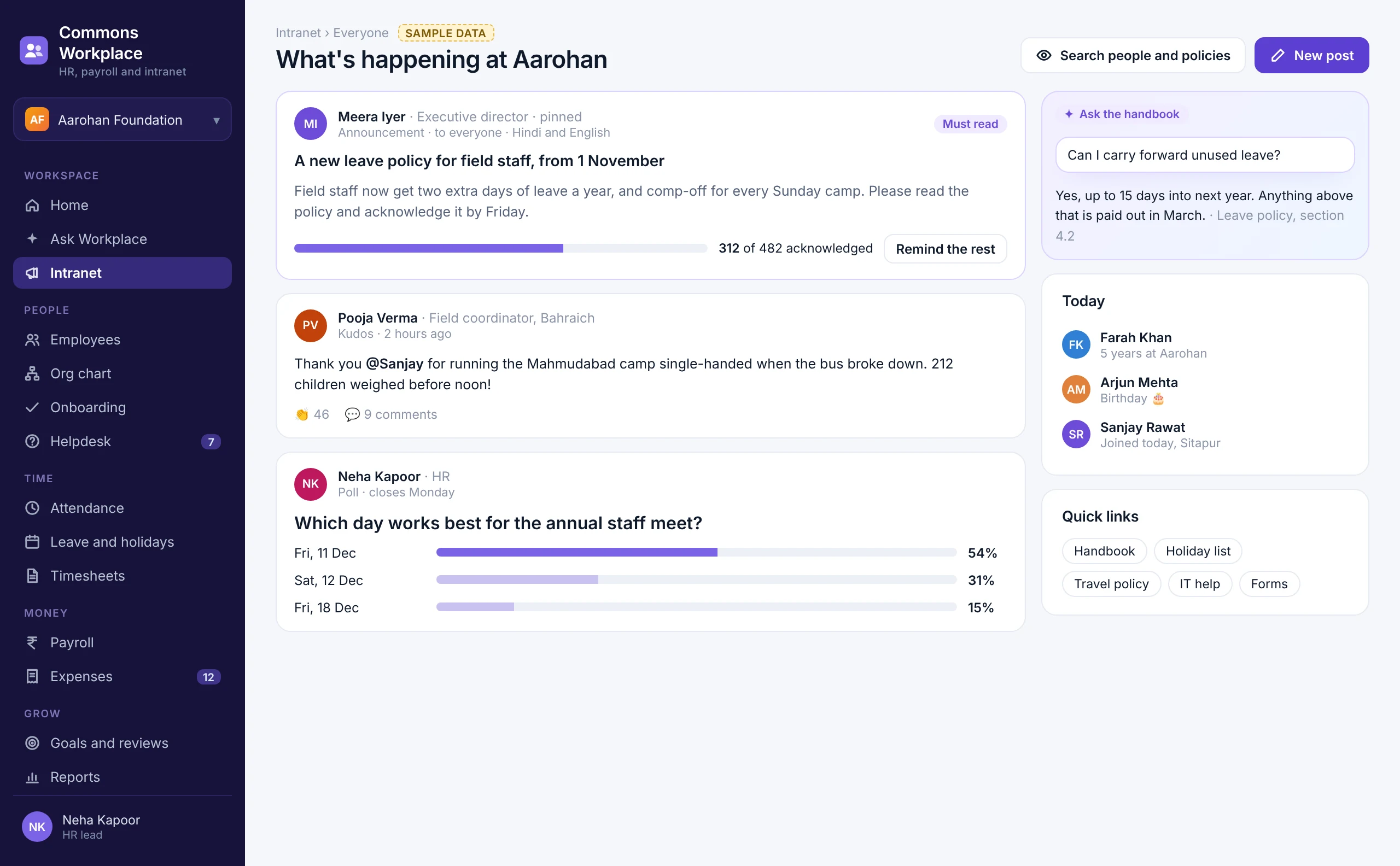
An intranet people actually open.

Announcements that reach the field, policies people acknowledge, a feed for the small wins, and a handbook you can ask questions. On the web and on every phone, in each person's language.

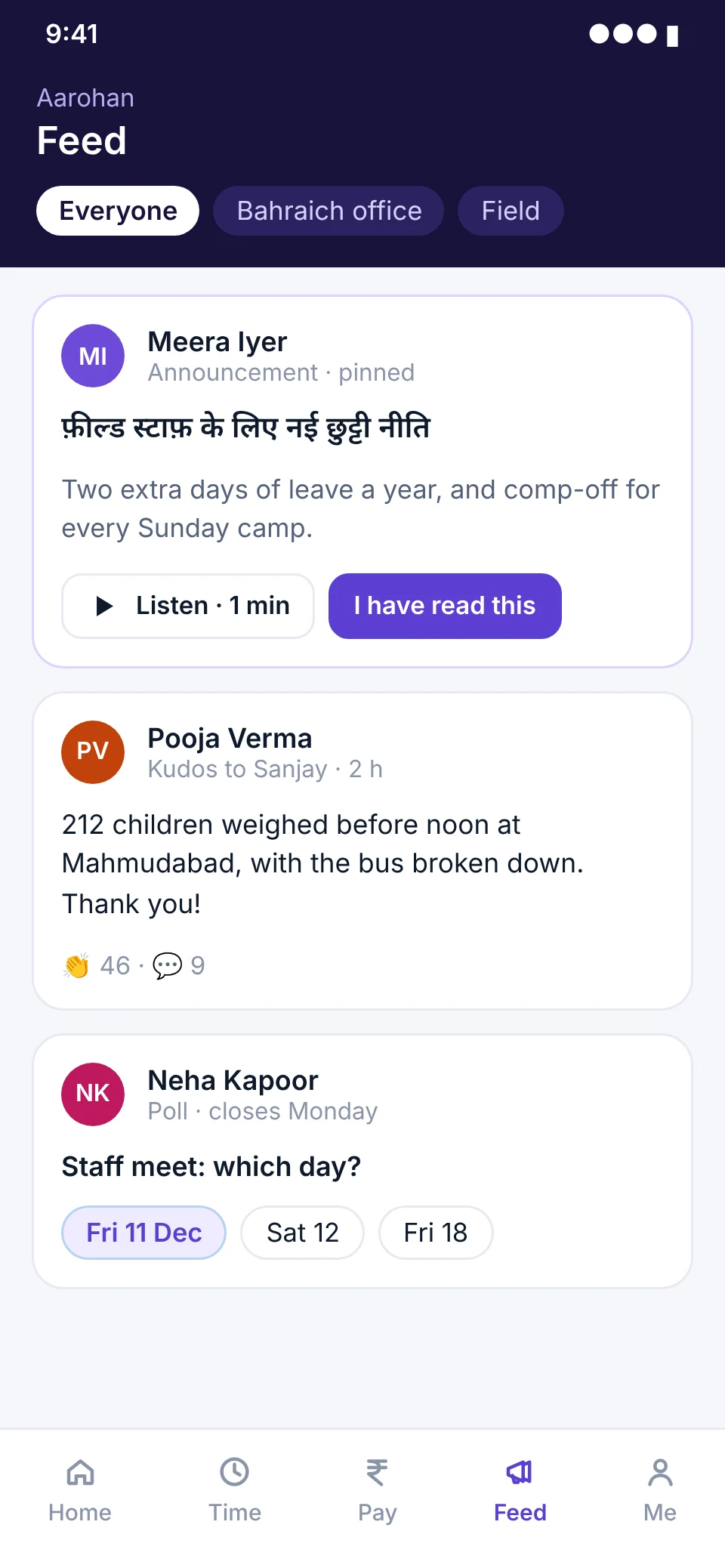
The intranet: a pinned announcement with acknowledgements, kudos, a poll, and answers from the handbook
  1. 01

    Announcements with read receipts

  2. 02

    Feed, kudos and celebrations

  3. 03

    Polls and pulse surveys

  4. 04

    People directory

  5. 05

    Handbook you can ask

From the first day to the last.

Every other part of looking after people, in the same place.

  • 01Onboarding and offboarding

    Checklists, documents, e-sign, IT and assets, and exit interviews.

  • 02Goals and OKRs

    Set, cascade and check in on goals, team by team.

  • 03Reviews and 360 feedback

    Self, manager and peer reviews, on your own cycle.

  • 04Skills and learning

    Courses and assessments, with Learning Experience Platform.

  • 05Compensation

    Salary structures, revisions, approvals and letters.

  • 06Engagement

    eNPS, pulse and engagement surveys, read in aggregate.

  • 07HR helpdesk

    Cases by category, owners, and response time tracking.

  • 08Reports and analytics

    Headcount, attrition, cost and time, or just ask.

Built for nonprofits. Ready for startups and enterprises.

The same product, set up three ways.

A woman in a blue checked sari bends to talk with women farmers sitting in a ploughed field

Nonprofits

For teams spread across offices and villages.

  • Salaries and time charged to each grant
  • Field staff on the phone, offline
  • Staff, consultants, fellows and volunteers
  • Hindi, Odia, Kannada and more
  • Donor-ready reports from payroll and timesheets

A small team talking and working on laptops around café tables in a bright office

Startups

For teams that grow every month.

  • Live in a day, with your salary structures
  • Onboarding from offer to first payslip
  • Goals, reviews and feedback built in
  • Plugs into your accounting and chat tools
A group of professionals in suits giving a thumbs-up in a formal conference room

Enterprises

For thousands of people and many entities.

  • Many entities, locations and pay groups
  • Custom workflows, roles and approvals
  • Single sign-on, audit logs and data in India
  • APIs and webhooks for your other systems

Switch on what you need. Plug into what you run.

Every module is a plugin. Start with payroll and leave, add the intranet next quarter, and connect to the tools you already use and to every other Commons product.

And with the tools you already use

Plus banks for salary transfer, biometric devices, accounting software, single sign-on, and an open API with webhooks.

A web app for the office. A mobile app for everyone.

The org chart, with reporting lines, team sizes and one manager's profile with a dotted-line report and an AI suggestion
The intranet feed on the phone: an announcement in Hindi with audio, kudos and a poll

HR, finance and managers work on the web. Everyone, including staff in the field, uses the app on Android and iPhone, in their own language. All sample data.

The Global Goals it moves.

5Gender equality
8Decent work and economic growth
10Reduced inequalities
17Partnerships for the goals

Every feature

Everything your people need, in one place.

People

  • Employee records

  • Org chart and reporting lines

  • Many entities

  • Onboarding and offboarding

  • Documents and e-sign

  • HR helpdesk

Time

  • Geo and selfie check-in

  • Offline attendance

  • Shifts and overtime

  • Leave policies and accrual

  • Holiday calendars

  • Timesheets to projects and grants

Money

  • Payroll with EPF, ESI, PT, LWF, TDS

  • Payslips and Form 16

  • Loans, advances and arrears

  • Full and final settlement

  • Expense claims with AI receipts

  • Grant-wise salary costing

Connect and grow

  • Announcements and feed

  • Polls and pulse surveys

  • Handbook you can ask

  • Goals, OKRs and reviews

  • Learning and skills

  • Ask Workplace AI assistant

Pricing that fits your team.

Priced per user per month. Start with the essentials and add more as you grow. Every plan includes the web and mobile apps.

Essentials

The core of HR, in one place

₹50/ user / month

  • Onboarding and offboarding
  • Employee database management
  • Document management
  • Time-off management (leave)
  • HR reports
Get started

Professional

Most popular

For teams that track time and grow people

₹70/ user / month

  • Everything in Essentials
  • Attendance management
  • Timesheets
  • Roster management
  • Intranet
  • Performance management
  • Compensation management
Get started

Enterprise

For large organisations and networks

Talk to us

  • Everything in Professional
  • HR help desk
  • Learning management system
  • Custom user interface and experience
  • Volunteers as workforce
Talk to us

Quick answers.

  • No. It is built with nonprofits in mind, because their needs are the hardest: field staff, many languages, grant-funded salaries. The same product runs startups and enterprises, with the modules and rules each one needs.

  • Yes. EPF, ESI, professional tax, labour welfare fund and TDS are worked out every month, with payslips, Form 16 and the reports you file.

  • Yes. Check-ins, leave and claims are saved on the phone and sync when it finds a signal.

  • Yes. Every module is a plugin. Turn on what you need now and add the rest later, without moving your data again.

  • Yes. We bring across your employees, salary structures, leave balances and history, and run one payroll side by side before you switch.

  • You do. It is held in India, under the DPDP Act, and you can export it at any time. Staff consent and data requests run through Commons Trust.

Works well with.

Commons Workplace shares one record with the rest of the Commons platform.

A group of laughing women in bright saris standing together with children

Look after your people. Let the system do the rest.

A short demo, set up with your own salary structures, leave rules and org chart.